

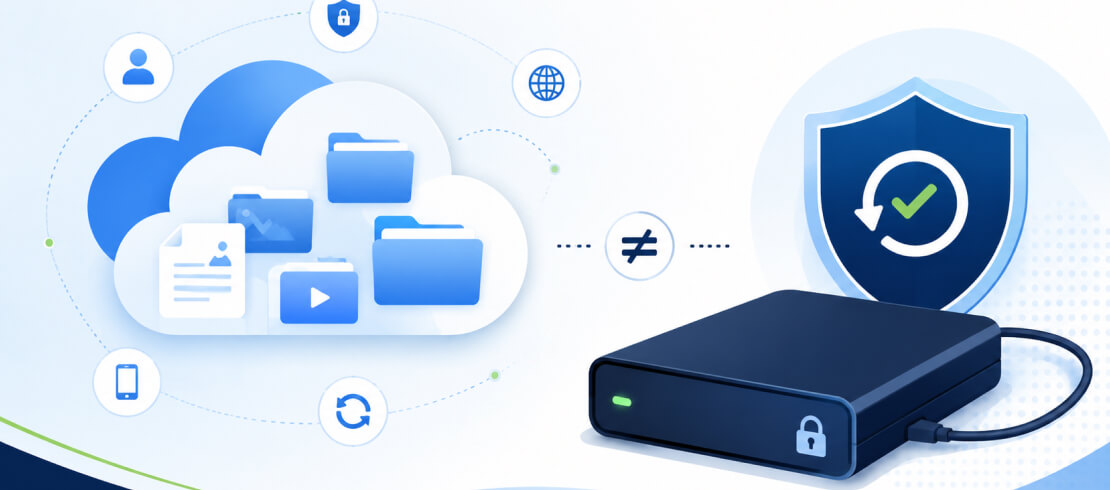
Hardware encryption has a specialized controller to instantly convert data into ciphertext as the drive writes to the storage device. Software encryption uses the host computer to translate files into unreadable data without proper credentials.
For the most sensitive data, hardware encryption provides stronger, tamper-resistant protection than native software or third-party tools.
What To Know:
Devices with hardware encryption have dedicated chips that process data independent of an operating system (OS). It is also known as full-disk encryption (FDE) because the chips encode every bit of data on the media.
Encrypted external drives and encrypted flash drives are examples of this technology. They safeguard personal information and private data with a secure controller that requires separate authentication to access files. The Advanced Encryption Standard (AES) is the most common cryptographic algorithm for these devices.
There are two popular types of hardware encryption for internal storage. The Trusted Platform Module (TPM) on modern motherboards manages cryptographic keys that verify the integrity of stored data. Self-encrypting drives (SEDs) use hardware within the device to achieve this goal. SEDs encrypt data as they record and decrypt files as they read.
As a result, hardware encryption gives users with strict data protection requirements greater control. Its design resists OS exploits, malware, and physical attacks because the encryption keys never leave the device. But hardware encryption comes with higher upfront costs and less flexible updates.
Encryption software relies on the central processing unit (CPU) of a computer to encode data and runs within the operating system. The method offloads the encryption to a built-in feature or an installed program.
Software encryption applies an algorithm to a file as it is saved, storing the data as ciphertext. When users load the file, an encryption key converts the data back to readable plaintext. Files are unusable without the encryption key.
Microsoft’s BitLocker and Apple’s FileVault adopt this approach. BitLocker integrates with the TPM for data storage on Windows, but it is still software encryption. The same goes for FileVault despite using an AES engine within the Secure Enclave. VeraCrypt is free, open-source encryption software for Windows, macOS, and Linux. Other third-party tools perform file-level encryption for Windows PCs, Macs, and Linux machines.
Encryption software is easy to deploy across a wide number of storage devices. However, it consumes CPU resources and shares the same attack surface as the OS.
While each method encrypts files to protect data at rest, in transit, and in use, they employ different techniques.
The table below highlights how the difference between hardware encryption and software encryption affects users in practice:
In most cases, hardware encryption beats software encryption. It isolates encryption keys from the system and extends protection to portable storage devices without impacting performance. Also, encrypted drives often destroy keys to resist brute-force attacks in the event of device loss or theft. As a result, they adhere to more rigorous cryptographic standards, such as FIPS 140-2 Level 3.
The main trade-off of hardware encryption when compared to software methods is higher costs. This drawback is especially true at a large scale.
The best encryption method depends on your situation. Data security is not one size fits all. It is a thoughtful strategy that seeks to reduce exposure to your biggest risks cost-effectively.
Best Use Cases for Hardware Encryption
Hardware encryption offers much stronger protection in the following circumstances:
- High-security settings with classified data or intellectual property.
- Regulated industries storing medical records, legal documents, account numbers, or payment methods.
- A business that transports data between several sites or a remote workforce.
- Environments where multiple users share the same device.
- Personal archives of sensitive data, such as tax returns, bank statements, credit reports, investment forms, property deeds, contracts, and wills.
- Local backups of photos, videos, or correspondence.
This high-value data could pose financial or reputational risks if it leaks, so hardware encryption makes a lot of sense.
Best Use Cases for Software Encryption
Software encryption is a practical solution when cost and scale are the primary concerns. Suitable usage includes:
- Companies that are looking to encrypt data across dozens or hundreds of workstations with IT policies.
- Users who want to encrypt specific files or folders before uploading them to a cloud storage platform.
- Teams seeking a solid baseline for low-risk data or a minimal budget for hardware upgrades.
Even if software is not the ideal method, any form of encryption is better than none at all.
When To Use Both Encryption Methods
Hardware encryption and encryption software are not mutually exclusive. You can even combine these methods to defend against a wider range of threats.
In this setup, hardware encryption provides complete protection against loss or theft and cold-boot attacks. Encryption software fills the gaps for cloud-bound data and enterprise environments with many systems.
The layered approach is common at large companies in industries with strict governance and with users who prioritize privacy.
Hardware-Encrypted USB Drives
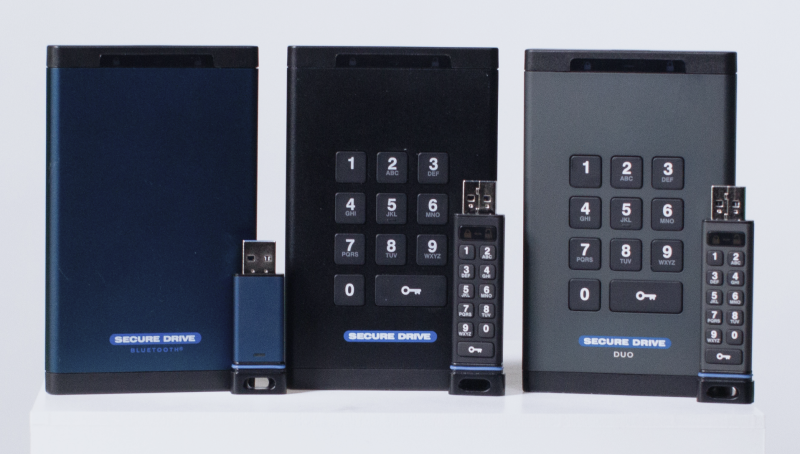
The data protection experts at SecureData deliver a range of services and products to safeguard what matters most. These offerings include USB devices with AES-XTS-256-bit encryption, FIPS 140-2 Level 3 validation, and our DriveSecurity® antivirus tool for file transfers.
SecureDrive® KP features a keypad to authenticate users. The SecureDrive® BT is unlocked via a mobile app on an Android device, an iPhone, or an Apple Watch. SecureDrive® DUO is an encrypted drive that blends the best of both models for comprehensive security and convenience. Each drive wipes data after ten failed attempts to prevent unauthorized access.
SecureUSB® KP, SecureUSB® BT, and SecureUSB® DUO bring those same security features to flash drives.
SecureDrive® SED is a self-encrypting drive that gives the improved performance of an SSD with enhanced protection.
Contact us to request a free evaluation and receive a 30-day trial with our products.
Common Questions About Encryption Methods
What is the difference between hardware encryption and encryption software?
The fundamental difference between hardware encryption and software encryption is where the encryption process occurs. Although the difference does impact data security, risk factors, and performance.
Hardware encryption is self-contained. The cryptographic processor and encryption keys reside on the device itself. Software encryption integrates with the host computer. Therefore, the system’s security ultimately determines the overall protection provided by the encryption.
What is a self-encrypting drive (SED)?
A self-encryption drive (SED) is a hard disk drive (HDD) or solid-state drive (SSD) that automatically encrypts data stored on the device. The hardware includes a specialized chip that handles encryption and decryption while the drive writes data or loads files. It does not need resources from the local CPU or user input, making it a simple, effective solution.
Can hardware encryption be hacked?
It is very unlikely if you are careful. Hardware encryption is usually tamper-resistant. Our SecureDrive® product line uses an epoxy coating to destroy the cryptographic module and encryption keys in the event of physical attacks. They also purge data in accordance with NIST’s 800-88 standards after ten unsuccessful attempts to access the storage device.
Is BitLocker hardware or software encryption?
BitLocker uses software encryption methods by default. Windows instructs the CPU to encrypt the entire volume of a system drive using BitLocker. It verifies users through a separate process during the PC’s boot sequence.
Although BitLocker still works in tandem with supported hardware, it often impacts performance.
Do I need hardware encryption if I already have software encryption?
It can help. Using both methods can offer more robust coverage against the full spectrum of threats. Hardware encryption is ideal for device loss or theft and physical attacks. Software encryption is best suited for large-scale deployments and for encrypting specific files or folders.




.png)
